 Using the discussion board. I think that it can be useful, people can leave comments and attachments in their own time and this can be communicated to many people. Unlike when sending an email you don't have to include the names of all the people you want to read it, meaning everyone can visit and more people than expected if they have the access. In this case, other than using and experiencing the discussion board, this activity seemed to make the task more complicated as in our groups we see each other everyday and could have discussed the task face to face which can make it easier to explain. In general I think this could be used well, I'm not 100% sure when I would use this in a school situation, but it is good to know about it and to have used it in case it does come up. It has been interesting to see some of the other issues this has been used for such as the use of mobile phones in classrooms etc. I found it very interesting as the conversation was open and anyone could read what had gone before and add a comment. It was good to see what other people thought especially from different groups. (Image is a "snap shot" of the discussion board in use, easy to see who initiated the topic and when etc)
Monday, 10 December 2007
Using The Discussion Board
Using the discussion board. I think that it can be useful, people can leave comments and attachments in their own time and this can be communicated to many people. Unlike when sending an email you don't have to include the names of all the people you want to read it, meaning everyone can visit and more people than expected if they have the access. In this case, other than using and experiencing the discussion board, this activity seemed to make the task more complicated as in our groups we see each other everyday and could have discussed the task face to face which can make it easier to explain. In general I think this could be used well, I'm not 100% sure when I would use this in a school situation, but it is good to know about it and to have used it in case it does come up. It has been interesting to see some of the other issues this has been used for such as the use of mobile phones in classrooms etc. I found it very interesting as the conversation was open and anyone could read what had gone before and add a comment. It was good to see what other people thought especially from different groups. (Image is a "snap shot" of the discussion board in use, easy to see who initiated the topic and when etc)

Saturday, 1 December 2007
Confused (without the dot com!)
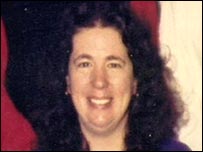 We understand how important inclusion is for all. In one lecture we were advised to include ethnic names when we write maths problems etc to promote inclusion. I read an article recently about Gillian Gibbons (right) a teacher in Khartoum. The children in her class chose a name for the class teddy. One child…whose name is Muhammad liked his name so much that they decided they wanted to name the teddy after him. And then all hell let loose. A parent complained to the authorities about Ms Gibbons who has now been arrested, but not currently charged.
Having read the article in the education section of BBC news online I understand why they have taken this case of blasphemy so seriously. Although it does seem extreme. The main case against Ms Gibbons seems to be that she has named a class teddy in a Christian school the name of the Islam’s Prophet, and thus giving the Prophet an image, which they consider insulting. But how can they say that Muhammad cannot have an image yet children can be named Muhammad? Why can’t the same principles apply to the teddy? The naming of the teddy was down to the children and they chose a name they liked, no insult was intended.
 Gordon Brown is asking for her release, Britain and the Sudan (left) have a good relationship which has the potential to be damaged depending on the outcome of this investigation. I think one of the most concerning details is the possible punishment if she is convicted. For naming a teddy Muhammad the 54-year-old teacher may be subjected to six months in prison, 40 lashes or fine….does this scare anyone else? If I have a class toy it will be named Bob and that will be the end of it.
I understand that they take their religion seriously and that they have strict beliefs about the Prophet Muhammad not having an image or form, but as I mentioned above I don’t see how you can name your children Muhammad and that be ok. I think this case is being blown out of proportion and will be interested to see the outcome.
The photos are from the BBC website http://news.bbc.co.uk/1/hi/world/africa/7114439.stm
Related Links:
Article
Video report
Thursday, 22 November 2007
Rosie!
 Rosie is my Sat Nav. My family know that I make a meal out of directions, NOT because I am a woman….but because I can’t be bothered to stop and look at a map, which I can read if needs must, but I feel it is easier to drive around in big circles, waste a lot of time and petrol and eventually arrive. Strangely I seem to be able to get where I am going but get lost on the way home. I clearly don’t have the homing pigeon instinct! So before I embarked on this teaching journey my family bought me Rosie. Who knows if I would have made it here from the Midlands without her! Finding my first placement school was a breeze; out on the road no one looks after me like Rosie.
My Rosie is a Garmin Sat Nav, she tells me where to go and when to do it. The technology she has is amazing! The colour of the screen lets me know if I am near a wood, near a river, in the daytime or at night. She tells me the instructions, which are written on the top of the screen, repeats it when I am closer and has a giant purple arrow to show me the way. On the off chance I don’t listen to her she says “recalculating” and gets me back on track! She is always calculating how long until I will arrive and displays it at the bottom of the screen, readjusting the time as I get held up on my way. She also counts down in miles and then in feet the distance I have until I need to turn, or will be entering a roundabout etc.
One of the best things Rosie does for me is she lets me know when I am near speed cameras. Firstly she beeps when I come into a speed camera area and a red line at the top of the screen tells me the speed of the area. A picture comes up on the screen when there is a camera on the road, and she will tell me if I am in a mobile speed camera area or if there are average speed cameras, that work out your speed over a long distance. When in these areas if I speed she beeps at me continually until I slow down.
Rosie is touch screen and so doesn’t compromise her size with buttons, she stores my recent destinations, allows me to save and name my more common trips. She lets me search for airports and train stations, restaurants and shopping centres.
Rosie is always looking out for me and before I set off she always makes me agree that I won’t touch her whilst driving, especially important now that it is illegal.
Rosie has many more tricks up her sleeve, but for now she gets me from A to B and I can go via C. My family don’t have to worry about me getting lost anymore and I have a fellow female to talk to in the car! Watch this YouTube clip, thankfully my Rosie is not like this (click on this link to see another side to Sat Nav's!)….but I am always polite so she never leads me astray!!!
(Picture of Rosie's cousin from: https://buy.garmin.com/shop/shop.do?pID=9160&locale=en_US#)
Saturday, 17 November 2007
Gain ICT confidence....
Worried about your ICT skills as you embark on becoming a teacher? I have found a website that is free and helps primary school teachers develop their use of ICT.
You can register for a weekly magazine called Sharing Good Practice
It looks like a really good site with surveys e.g. on children’s use of mobile phones – a topic on one of the discussion boards recently. Every week they look into four new lessons and includes activities e.g. word searches.
The site is called Ictopus, visit today and improve your ICT confidence!
If you are worried about how ICT and Ofsted are linked the you can visit an Educational and Communications Technology Agency (Becta) and look at the self review framework, and see how far you need to go to include ICT into your lessons in order to impress on that first important Ofstead meeting!
ICT is something that worries a lot of potential and current teachers in primary school, especially with those children that seem to have more knowledge than you, but at the same time you want to help encourage those that don’t have the same confidence or access to computers as others. Lets work together to provide a confident front when it comes to ICT.
You can register for a weekly magazine called Sharing Good Practice
It looks like a really good site with surveys e.g. on children’s use of mobile phones – a topic on one of the discussion boards recently. Every week they look into four new lessons and includes activities e.g. word searches.
The site is called Ictopus, visit today and improve your ICT confidence!
If you are worried about how ICT and Ofsted are linked the you can visit an Educational and Communications Technology Agency (Becta) and look at the self review framework, and see how far you need to go to include ICT into your lessons in order to impress on that first important Ofstead meeting!
ICT is something that worries a lot of potential and current teachers in primary school, especially with those children that seem to have more knowledge than you, but at the same time you want to help encourage those that don’t have the same confidence or access to computers as others. Lets work together to provide a confident front when it comes to ICT.
Friday, 16 November 2007
Blogs 4 Schools
I have recently read an article in Junior education magazine about blogs in schools. It came up with some interesting points, below I have reflected on what I have read….
Potentially blogging in school could be a massive success…if it is approached in the right way and monitored. The audience for the children could be huge too. Other schools could be involved, children could produce blogs on recent books they have read, whether with their class or individually and could use the blog to recommend books to other children in other schools. Using one regularly could give children responsibility; perhaps on a weekly basis a different group could be in charge of the postings. It gives a point, a meaning, a reason to writing and practising computer skills and competency; it makes it real and relevant.
The ability to arrange and re-arrange the lay out of the page, or the blog itself allows the children to organise their thoughts, combined with the use of pictures, links, graphs etc. It can be a great motivational tool, for example the first 5 children to correctly complete the worksheet can do today’s blog. But most importantly it gives children a voice, and it is out there for those who are willing to listen (read!).
The children have to come up with snappy titles for each entry and a blog name. In setting up the blog you (as the teacher) can have complete control and can check and edit the children’s work. It can be a great way to make contact with other schools and together crack the World Wide Web. You can inform parents of the going’s on in the classroom…once set up and running the children can check it when home, parents at the office etc.
With power, comes great responsibility. This can allow you to talk to the children about Internet safety, about silly comments that may be damaging to others self-esteem and how this is not the place for those comments. However this can be controlled as all comments can be emailed to the teacher before they are posted.
As the children should not be identifying themselves they could create pseudonyms, perhaps pretend they are spies and so assume a role, the class could create blogging rules, keeping blogging safe and fun.
Two schools are mentioned in the article as having successfully set up a class/school blog, check out their blogs, see how it is really working in schools today: Hope CE Primary School and Sandaig Primary School Having looked at these blogs I am so impressed at the standard even a year 2 class is achieving. It puts ours to shame!
Ten ideas the article suggests for happy fun classroom blogging:
· Diary of a science experiment
· Artwork Gallery
· List of links, good websites and other blogs
· Work of the day/week/month
· Homework challenges
· On going class novel
· Poem anthology
· Plan of the week’s lessons
· Share any resources by parents, children and teachers
· Menu for the week
Potentially blogging in school could be a massive success…if it is approached in the right way and monitored. The audience for the children could be huge too. Other schools could be involved, children could produce blogs on recent books they have read, whether with their class or individually and could use the blog to recommend books to other children in other schools. Using one regularly could give children responsibility; perhaps on a weekly basis a different group could be in charge of the postings. It gives a point, a meaning, a reason to writing and practising computer skills and competency; it makes it real and relevant.
The ability to arrange and re-arrange the lay out of the page, or the blog itself allows the children to organise their thoughts, combined with the use of pictures, links, graphs etc. It can be a great motivational tool, for example the first 5 children to correctly complete the worksheet can do today’s blog. But most importantly it gives children a voice, and it is out there for those who are willing to listen (read!).
The children have to come up with snappy titles for each entry and a blog name. In setting up the blog you (as the teacher) can have complete control and can check and edit the children’s work. It can be a great way to make contact with other schools and together crack the World Wide Web. You can inform parents of the going’s on in the classroom…once set up and running the children can check it when home, parents at the office etc.
With power, comes great responsibility. This can allow you to talk to the children about Internet safety, about silly comments that may be damaging to others self-esteem and how this is not the place for those comments. However this can be controlled as all comments can be emailed to the teacher before they are posted.
As the children should not be identifying themselves they could create pseudonyms, perhaps pretend they are spies and so assume a role, the class could create blogging rules, keeping blogging safe and fun.
Two schools are mentioned in the article as having successfully set up a class/school blog, check out their blogs, see how it is really working in schools today: Hope CE Primary School and Sandaig Primary School Having looked at these blogs I am so impressed at the standard even a year 2 class is achieving. It puts ours to shame!
Ten ideas the article suggests for happy fun classroom blogging:
· Diary of a science experiment
· Artwork Gallery
· List of links, good websites and other blogs
· Work of the day/week/month
· Homework challenges
· On going class novel
· Poem anthology
· Plan of the week’s lessons
· Share any resources by parents, children and teachers
· Menu for the week
Die Hard 4.0

The latest Die Hard movie is about a “massive computer attack on the U.S.” even the title Die Hard 4.0 is like a software program…version 4.0.
The thrilling film is about computer hackers, seeing the amount of technology that surrounds them and how fast they can negotiate around the World Wide Web etc is astounding. In the film the “terrorists” use their computers to change traffic signals at a tunnel, causing the lights at both ends to say use all lanes. Leading to a massive head on collisions for 4 lanes of traffic.
They are also using computers to track people, all the police cars have tracking devices on them, and the “good guys” are looking for a “digital fingerprint…there has to be one…FIND IT!!!” Throughout the film they track people through satellites and using the security cameras…all from the comfort of their base…. They appear to be able to control and track the world.
The film takes on the issue of Virtual Terrorism. One code and the whole world will come crashing down, most of the world’s technology could be controlled by remote, but some are manual.
Is Virtual Terrorism a real threat? Yes this is only a film, but could it have real merits? So much is digital these days and we need computers for everything, to change our traffic lights, (in the film all the lights were put on green at an intersection causing a mass crash), etc. The digital ‘wave’ that we are in…could it be taken over by a terrorist attack? Could the government’s secrets, finances and defence plans be lost in a moment, due to a virtual take over?
In the present day data, be it finances or information etc can be transferred in a microsecond. Just think if we were still in the days of pen and paper, everything would be filed in draws, there would be no backups, and terrorists would have to steal originals or copy out by hand details that they needed to steal. Granted films wouldn’t be as exciting if people were running around with bits of paper, stopping and copying something else on to it.
The technological advances are of course a blessing, how otherwise would I display my Blog? Short of writing it out and walking around with a sandwich board displaying my thoughts! I even need a code to get into my building….but what if there is a malfunction? How would I get in? That wouldn’t happen with a key! Technology is the future and we tend to accept it, but how open is it to attack? People already abuse the Internet, grooming children etc. Is it just a matter of time before Die Hard 4.0 becomes a reality?
Die Hard 4.0 picture is from google images: http://www.firstshowing.net/img/diehard4.0poster-big.jpg
Monday, 5 November 2007
ICT in my SBT1 Serial Days
I have spent the past week in a school where I am to complete my first school base training on my journey to teaching! I was really interested in the amount of ICT the children were exposed to or interacted with during their week. During my serial days unfortunately I had two inset days, followed by a special Halloween day and then two days of a science week. So to all intense and purposes this was not a "normal" week and so I don't feel I got a true idea of what ICT the children get to use. However in the three days I spent with them we used the computer suite several times! I think it is really important for children to have continual access to computers and ICT, to make them part of their everyday life, especially as most of these children don’t have access to computers etc at home. They obviously have a good deal of practice at school, as most were extremely confident, which also shows how quickly they can acquire new skills, especially compared to adults.
I was impressed when I first went to see my classroom that attached to it was a computer suite compromising of at least 32 computers just for my class, not all classes have their own suite, but there are several suites around the building. All were flat screen with the most updated software and internet connection. (Although, in saying that none of the classrooms had SMART boards, which was disappointing as I was keen to practice on one). The children had assigned seats and their own passwords (Year 4 class) and were more than able to navigate themselves around the desktop and different programs etc.
I was present and participated largely in one ICT lesson, which was a set up for a Maths/Science lesson the next day. The children were learning how to produce a simple bar chart on an Excel spreadsheet. Initially the teacher explained about the cells, and the types of things you could do with one. He then encouraged the children to create a table and use the borders tool to make a box around the table. One of the two “ICT” staff, (they are teachers but who have more knowledge about ICT) lead the ICT sessions, whilst the class teacher took notes and learned with the children as she was not confident. Fortunately I have had quite a lot of ICT training from my university course and subsequent jobs that I was able to assist and have offered the class teacher support during my placement.
Whilst watching the ICT lesson progress, with myself, the class teacher and LSA's spread throughout the room I found that the lay out of rows and rows of computers was not teacher friendly. The children had computer chairs (meaning those on wheels) which did not help, you were always tripping over someone and the children were much more free to move about and just "pop" over to someone else's computer. I also found that the children at the back of the class were too far away to see the board properly and so some spent the lesson messing around, whilst others went off into their own world and so had no idea what to do when the teacher handed back over to them. I have suggested that they look into a system where the teachers computer takes over the children's computer, the child then has a screen in front of them mimicking what is on the board and it means that their mouse won't work and so they can not be messing around going on things they shouldn't. Hopefully it is something that the school can take advantage of and help any of those lagging behind.
The next day the children were to create bar chats to show the results of an experiment, where they had recorded the time taken to dissolve different sugars (caster, icing, cubes etc) into water. As my group had completed this task first I took them into the computer suite and led the lesson with more children filtering in as and when they had completed the conclusion of their experiment. The class teacher and the LSA, for that day, had some knowledge but were not confident with Excel and the graph process, if problems occurred they were often unsure of how to solve it. This really boosted my confidence in the ICT area as I was able to step in and for the lesson was the “expert”.
The children had time at the end of the maths/science lesson and on some other occasions when they had completed their work to go into the computer room and play on the several games they had. I have not had time to note down exactly what games they used but I saw typing practice, where they had to hold their hands in a certain place and learn to type without looking, which is how I learned at primary school. Something, which as an adult would be quite boring and frustrating, but as a child I used to be motivated to get it right! I saw many playing one game where the computer provides a background e.g. a dentist surgery, a park or outside a café etc, the children have to put people and objects in to create and image. They could alter the size of images to make the overall picture appear 3D, as people could be made bigger and smaller and put to the front and back of the image, they did not seem to have a problem with this scaling to create a certain affect. There were also maths games and science games, where they could label parts of the body etc.
The children also wrote a gruesome poem to do with Halloween, which they then typed up and changed the font to make it look scary!
The classroom had a projector onto the whiteboard, which I think can be easier, as you can use it as you would an interactive board….just without the interactive parts. From my limited use of SMART boards I find it difficult when you want to use it as a normal board e.g. writing on it etc. Having a normal whiteboard means that you can write normally without the board having a mind of it’s own! The class had a digital camera and I saw work that they had done using the camera, and whilst looking at different solids and liquids in groups the teacher went round photographing the children in action!
I do feel strongly that ICT and computers are the future, and I feel that children should not be held back from a world including ICT, due to teachers with a lack of confidence or knowledge. In general I think teachers should continually boost their knowledge as unfortunately technology is changing faster than fashion fads these days, just look at the new Windows Vista, completely different to the current Office system that we use but will soon make the Office system as obsolete as typewriters. If the children come into class with a new hand held game, borrow one from someone. Talk to children about what they experience and play with, incorporate it as much as possible into your lessons. Keep them interested, make it real and relevant, at the end of the day we have a job and it is about them and preparing them for their journey.
I was impressed when I first went to see my classroom that attached to it was a computer suite compromising of at least 32 computers just for my class, not all classes have their own suite, but there are several suites around the building. All were flat screen with the most updated software and internet connection. (Although, in saying that none of the classrooms had SMART boards, which was disappointing as I was keen to practice on one). The children had assigned seats and their own passwords (Year 4 class) and were more than able to navigate themselves around the desktop and different programs etc.
I was present and participated largely in one ICT lesson, which was a set up for a Maths/Science lesson the next day. The children were learning how to produce a simple bar chart on an Excel spreadsheet. Initially the teacher explained about the cells, and the types of things you could do with one. He then encouraged the children to create a table and use the borders tool to make a box around the table. One of the two “ICT” staff, (they are teachers but who have more knowledge about ICT) lead the ICT sessions, whilst the class teacher took notes and learned with the children as she was not confident. Fortunately I have had quite a lot of ICT training from my university course and subsequent jobs that I was able to assist and have offered the class teacher support during my placement.
Whilst watching the ICT lesson progress, with myself, the class teacher and LSA's spread throughout the room I found that the lay out of rows and rows of computers was not teacher friendly. The children had computer chairs (meaning those on wheels) which did not help, you were always tripping over someone and the children were much more free to move about and just "pop" over to someone else's computer. I also found that the children at the back of the class were too far away to see the board properly and so some spent the lesson messing around, whilst others went off into their own world and so had no idea what to do when the teacher handed back over to them. I have suggested that they look into a system where the teachers computer takes over the children's computer, the child then has a screen in front of them mimicking what is on the board and it means that their mouse won't work and so they can not be messing around going on things they shouldn't. Hopefully it is something that the school can take advantage of and help any of those lagging behind.
The next day the children were to create bar chats to show the results of an experiment, where they had recorded the time taken to dissolve different sugars (caster, icing, cubes etc) into water. As my group had completed this task first I took them into the computer suite and led the lesson with more children filtering in as and when they had completed the conclusion of their experiment. The class teacher and the LSA, for that day, had some knowledge but were not confident with Excel and the graph process, if problems occurred they were often unsure of how to solve it. This really boosted my confidence in the ICT area as I was able to step in and for the lesson was the “expert”.
The children had time at the end of the maths/science lesson and on some other occasions when they had completed their work to go into the computer room and play on the several games they had. I have not had time to note down exactly what games they used but I saw typing practice, where they had to hold their hands in a certain place and learn to type without looking, which is how I learned at primary school. Something, which as an adult would be quite boring and frustrating, but as a child I used to be motivated to get it right! I saw many playing one game where the computer provides a background e.g. a dentist surgery, a park or outside a café etc, the children have to put people and objects in to create and image. They could alter the size of images to make the overall picture appear 3D, as people could be made bigger and smaller and put to the front and back of the image, they did not seem to have a problem with this scaling to create a certain affect. There were also maths games and science games, where they could label parts of the body etc.
The children also wrote a gruesome poem to do with Halloween, which they then typed up and changed the font to make it look scary!
The classroom had a projector onto the whiteboard, which I think can be easier, as you can use it as you would an interactive board….just without the interactive parts. From my limited use of SMART boards I find it difficult when you want to use it as a normal board e.g. writing on it etc. Having a normal whiteboard means that you can write normally without the board having a mind of it’s own! The class had a digital camera and I saw work that they had done using the camera, and whilst looking at different solids and liquids in groups the teacher went round photographing the children in action!
I do feel strongly that ICT and computers are the future, and I feel that children should not be held back from a world including ICT, due to teachers with a lack of confidence or knowledge. In general I think teachers should continually boost their knowledge as unfortunately technology is changing faster than fashion fads these days, just look at the new Windows Vista, completely different to the current Office system that we use but will soon make the Office system as obsolete as typewriters. If the children come into class with a new hand held game, borrow one from someone. Talk to children about what they experience and play with, incorporate it as much as possible into your lessons. Keep them interested, make it real and relevant, at the end of the day we have a job and it is about them and preparing them for their journey.
Subscribe to:
Posts (Atom)
